Posts

Showing posts with the label Windows 10

Visual Studio: The Windows SDK version 8.1 was not found. Install the required version of Windows SDK or change the SDK version in the project

I encountered this issue when trying to compile some old code. I tried to download the SDK, but there are no active links. My resolution was to install Visual C++' support in Visual Studio 2015 by re-running the installer.​ Its like killing a fly with a hand-grenade (3GB install), but as least it resolved the problem.
SharePoint 2010: Unable to open Central Administration

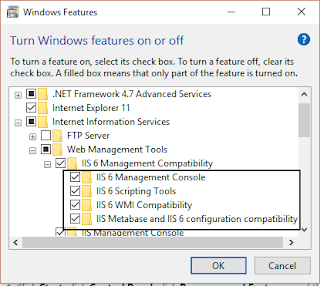
I have been trying to install a SharePoint 2010 development environment on my local Windows 10 laptop (dont ask why) and I have finally been able to load Central Admin. Here are the issues I encountered: 1. Ensure you have Windows 10 Pro - you will need to activate Windows Auth before you install 2. Run the following script if Central Admin is start /w pkgmgr /iu:IIS-WebServerRole;IIS-WebServer;IIS-CommonHttpFeatures;IIS-StaticContent;IIS-DefaultDocument;IIS-DirectoryBrowsing;IIS-HttpErrors;IIS-ApplicationDevelopment;IIS-ASPNET;IIS-NetFxExtensibility;IIS-ISAPIExtensions;IIS-ISAPIFilter;IIS-HealthAndDiagnostics;IIS-HttpLogging;IIS-LoggingLibraries;IIS-RequestMonitor;IIS-HttpTracing;IIS-CustomLogging;IIS-ManagementScriptingTools;IIS-Security;IIS-BasicAuthentication;IIS-WindowsAuthentication;IIS-DigestAuthentication;IIS-RequestFiltering;IIS-Performance;IIS-HttpCompressionStatic;IIS-HttpCompressionDynamic;IIS-WebServerManagementTools;IIS-ManagementConsole;IIS-IIS6ManagementCompatibili...

SharePoint 2010 on Windows 10: Solving COMException / Unknown error (0x80005000)

Image
This is not a problem I expected to solve, but it happened anyway. A client is using SharePoint 2010 and I need a local development farm. I started with the usual configuration requirements: Add <Setting Id="AllowWindowsClientInstall" Value="True"/> to the Setup config Created a script to make a new configuration database so that I dont have to join a domain $secpasswd = ConvertTo-SecureString "MyVerySecurePassword" -AsPlainText -Force $mycreds = New-Object System.Management.Automation.PSCredential ("mydomain\administrator", $secpasswd) $guid = [guid]::NewGuid(); $database = "spconfig_$guid" New-SPConfigurationDatabase -DatabaseName $database -DatabaseServer myservername\SharePoint -FarmCredentials $mycreds -Passphrase (ConvertTo-SecureString "MyVerySecurePassword" -AsPlainText -force) The PowerShell script was generating the error. The solution is simple - you need to enable IIS 6.0 Management Compat...