Posts

Showing posts with the label Sharepoint 2010

SharePoint 2010: Unable to open Central Administration

I have been trying to install a SharePoint 2010 development environment on my local Windows 10 laptop (dont ask why) and I have finally been able to load Central Admin. Here are the issues I encountered: 1. Ensure you have Windows 10 Pro - you will need to activate Windows Auth before you install 2. Run the following script if Central Admin is start /w pkgmgr /iu:IIS-WebServerRole;IIS-WebServer;IIS-CommonHttpFeatures;IIS-StaticContent;IIS-DefaultDocument;IIS-DirectoryBrowsing;IIS-HttpErrors;IIS-ApplicationDevelopment;IIS-ASPNET;IIS-NetFxExtensibility;IIS-ISAPIExtensions;IIS-ISAPIFilter;IIS-HealthAndDiagnostics;IIS-HttpLogging;IIS-LoggingLibraries;IIS-RequestMonitor;IIS-HttpTracing;IIS-CustomLogging;IIS-ManagementScriptingTools;IIS-Security;IIS-BasicAuthentication;IIS-WindowsAuthentication;IIS-DigestAuthentication;IIS-RequestFiltering;IIS-Performance;IIS-HttpCompressionStatic;IIS-HttpCompressionDynamic;IIS-WebServerManagementTools;IIS-ManagementConsole;IIS-IIS6ManagementCompatibili...
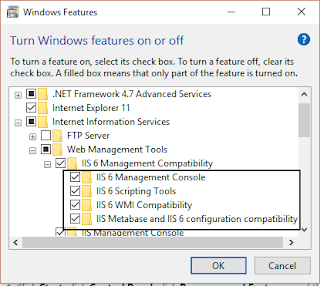
SharePoint 2010 on Windows 10: Solving COMException / Unknown error (0x80005000)

Image
This is not a problem I expected to solve, but it happened anyway. A client is using SharePoint 2010 and I need a local development farm. I started with the usual configuration requirements: Add <Setting Id="AllowWindowsClientInstall" Value="True"/> to the Setup config Created a script to make a new configuration database so that I dont have to join a domain $secpasswd = ConvertTo-SecureString "MyVerySecurePassword" -AsPlainText -Force $mycreds = New-Object System.Management.Automation.PSCredential ("mydomain\administrator", $secpasswd) $guid = [guid]::NewGuid(); $database = "spconfig_$guid" New-SPConfigurationDatabase -DatabaseName $database -DatabaseServer myservername\SharePoint -FarmCredentials $mycreds -Passphrase (ConvertTo-SecureString "MyVerySecurePassword" -AsPlainText -force) The PowerShell script was generating the error. The solution is simple - you need to enable IIS 6.0 Management Compat...

SharePoint 2010: How do I download a wsp?

I recently had the requirement to move a wsp from one farm to another and the source component was nowhere to be seen. I found a nifty little script  here  that gave me a solution: $farm = Get-SPFarm $file = $farm.Solutions.Item("mycode.wsp").SolutionFile $file.SaveAs("c:\temp\mycode.wsp")

SharePoint 2010: How do I set the value multi select lookup column?

A seed data script I was writing required a multi value selection lookup column to be pre populated. Setting a single value is simple - use <Id>;#<Text> - and all is well. But how do you set multiple values? The solution is just as simple; use ;# as the delimiter between items. For example, you could set your column with the following: <ID1>;#<Text1>;#<ID2>;#<Text2> Semi-colon Hash (;#) is the delimiter of choice.

SharePoint 2010: How do I install SharePoint Server on Windows 7?

Once you have download SharePointServer.exe, you will need to extract the files from the executable. From the command prompt run: SharePointServer.exe /extract:c:\sp2010\ This will extract the installation files. Second, you need to 'enable' a Windows 7 installation. In order to do this, you will need to edit one of the configuration files. Navigate to C:\sw\sp2010\Files\Setup and add the following line to the bottom on the config.xml (before the closing Configuration tag). <Setting Id="AllowWindowsClientInstall" Value="True"/> You should be good to go IF YOU HAVE SQL SERVER 2008 R2. If you are running SQL Server 2012, you will need SharePoint Server 2010 SP1.

PowerShell: How do I append data to an existing file in SharePoint with a new line and quotes?

A recent proejct required the injection of some runtime data in my require js configuration file. The following code allowed me to inject the new values into the file. $site = Get-SPSite "http://mysite" $file = $site.RootWeb.GetFile("/Style Library/myfile.js") if (($file -ne $null) -and ($file.Exists -eq $true)) { $binaryAsIs = $file.OpenBinary() $asciiEncoding = New-Object -TypeName System.Text.UTF8Encoding $asIs = $asciiEncoding.GetString($binaryAsIs)         # This is the text to append to the top.         # `r`n will create a crlf (new line)         # $([char]34) will embed a double quote in the text $new = "// Here is some next text `r`n //and here is text in $([char]34)quotes([char]34)`r`n" $newFile = $new + $asIs $binaryToBe = $asciiEncoding.GetBytes($newFile) $file.CheckOut() $file.SaveBinary($binaryToBe) $file.CheckIn("") $file.Publish("") } $site.Dispose()

Powershell: Recusively Check In and Publish files in a SharePoint Document Library

I have combined the scripts from Paul King ( here ) and Brijendra Gautam ( here ) to create my own version of the script. Function CheckInAndPublishFolderItemsRecusively( [Microsoft.SharePoint.SPFolder] $folder ) {     # Create query object     $query = New-Object Microsoft.SharePoint.SPQuery     $query.Folder = $folder     # Get SPWeb object     $web = $folder.ParentWeb     # Get SPList     $list = $web.Lists[$folder.ParentListId]     # Get a collection of items in the specified $folder     $itemCollection = $list.GetItems($query)     # Iterate through each item in the $folder     foreach ($item in $itemCollection)     {         # If the item is a folder         if ($item.Folder -ne $null)         {             # Call the Get-Items function recursively for ...

SharePoint 2010 FAST Search: How do I create Managed Properties?

I have delving into the wonders of FAST Search and found this  very helpful script to create managed properties. It definitely saved my a lot of time and headaches. Thank you Ivan Josipovic . Here is a copied version of the text: function New-FASTManagedProperty([string]$Name, [string]$CrawledPropertyName, [string]$Type,[bool]$Refinement,$Sortable) { if ( (Get-PSSnapin -Name Microsoft.FASTSearch.PowerShell -ErrorAction SilentlyContinue) -eq $null ) {    Add-PsSnapin Microsoft.FASTSearch.PowerShell }     switch ($Type)     {         "Text" {$type = "1"}  #variant 31         "Integer" {$type = "2"} #variant 3         "Decimal" {$type = "5"} #variant 5         "DateTime" {$type = "6"} #variant 64         "Float" {$type = "4"} #variant 5 ?         "Binary" {$type = "3"}  #variant 11     } ...

SharePoint: How do I find out (quickly) if my server has a Kerberos ticket?

A new SharePoint project introduced the prospect of the dreaded 'double hop' problem and the team was looking at ways to resolve the issue. Naturally, Kerberos (and delegation) was the natural solution. However, we were not sure if the Farm and Servers had Kerberos enabled. A quick one word line command resolved the problem:  klink . This command displays a list of currently cached Kerberos tickets.

SharePoint 2010: Why cant I deploy my timer job to the specific Web Application?

Writing a timer service is easy ans there are many examples available. However, while following the instructions I encountered several problems deploying the job to a single web application. I followed the basic instructions (set the feature scope to WebApplication and the 'Assembly Deployment Target' to GlobalAssemblyCache) but the timer job was being activated across all web applications. Here is how I resolved it: 1. Set the project property 'Include Assembly In Package' to false. This removes the 'Assembly Deployment Target' option. 2. Add the output assembly as an 'Additional Assembly' in the 'Advanced' section of the package manifest. 3. Change the 'Activate on Default' in the feature properties to false. The feature will be deployed to the Web Application, but not activated. Use PowerShell to activate it.

SPQuery returning error "One or more field types are not installed properly. Go to the list settings page to delete these field"

A recent Caml Query was returning the follow error: One or more fields are not installed properly. The most likely cause of the problem is that the internal names are not correct in the query. However, this was not the cause. The culprit was my very extensive column naming convention which was more than 32 characters long. It seems that the name was being truncated in the query. A quick rename of the column resolved the problem.

JQuery-Upload - a few ways to upload a file

I was recently using the magnificent  jQuery-File-Upload  in a SharePoint 2010 application. I encountered the following scenarios to upload files. 1. Load immediately when the file is selected This is the easiest option and is pretty much OOTB. $('#fileupload').fileupload({                 dataType: 'json',                 headers: {                     Accept: "application/json"                 },                 accept: 'application/json',                 formData: {                     url: "http://mytargetlocation",                     title: "myTitle"                 }, ...

SharePoint 2010: No item exists at http://site?ID=1. It has be been deleted by another user.

What the heck? I added a query string parameter to pass a value to a REST API and my solution exploded. Fortunately, there is a simple solution provided by our friends at Microsoft (see here ). It seems that the querystring parameter 'ID' is reserved, so renaming it to something else (in my case, docid) resolved the problem.

SharePoint 2010: Why does my RunWithElevatedPrivileges not pick up the context of the Application Pool user?

It is important to remember that RunWithElevatedPrivileges requires its own SPWeb. If you reuse a existing SPWeb, you won't run elevated, but with the initial context. For Example, the following function is intended to perform some actions on the sub sites for the given site. The access requires elevated permissions: This function will not work: private void DoStuff (SPWeb web) { SPSecurity.RunWithElevatedPrivileges(() => { foreach (SPWeb w in web.Webs) {  // Still running under logged in user credential } }); } but this will: private void DoStuffProperly(SPWeb web) { SPSecurity.RunWithElevatedPrivileges(() => { using (SPSite site = new SPSite(web.Url)) { using (SPWeb w = site.OpenWeb()) { // Running under the application pool credential } } }); }

SharePoint 2010: Why is my name displaying as DOMAIN\LOGIN instead of Displayname?

My development environment was displaying my name as 'DOMAIN\LOGIN' instead of 'DisplayName'. I found the solution in  this  post - a simple one-line PowerShell command: Get-SPUser -Web http://myweb.com | Set-SPUser -SyncFromAD

SharePoint 2010: How do I load a picture and meta data to an asset library?

I recently had to load some seed data for a SharePoint site that required the population of some images into an asset library. After a lot of playing and experimenting, I eventually settled on the pattern of 1. Add the files to an image folder in the Style Library 2. Reading in the source file into a byte array 3. then loading the array into a new file in the target location. Its a little convoluted, but it was the only solution that met my requirement. I then populated a dictionary with a name/value pair that mapped to the columns in my content type. Here are the methods I used:      public void UploadFile(SPWeb webParam, string fileUrl, SPList list, Dictionary<string, string> parameters)         {             try             {                               using (SPSite site = new SPSite(webPara...

SharePoint 2010: How do I populate a lookup field in C#?

I had the requirement to populate seeddata in a simple list structure that contained some lookup columns. The lookup requires the identifier/display text of the source object - in my case it was a ParentItem that was being used in the ChildItem table. I created a lookup column 'Parent' and added it the child list. The following code resolved the problem. Please note that this code is for seed data that has expected values and does no validation checking or use any defensive programming. // Add items to the parent item SPList parentList = web.Lists["ParentItem"]; SPListItem item = parentList.Items.Add(); item["Title"] = "Parent Header 1"; item.Update(); // Add the child item SPList childList = web.Lists["ChildItem"]; item = childList.Items.Add(); SPListItem parentItem = GetHeaderItem(parentList, "Parent Header 1"); item["Title"] = "My Child Item"; item["Parent"] = new SPFieldLookupV...

SharePoint 2010: Add an Event Receiver in code

Some requirements demand the adding of Event Receivers in code and not as features. Fortunately, there is a simple method to perform this task. The following code adds an 'ItemAdding' event receiver in the class 'MyEventReceiver'. The project namespace is 'MyProject' using (SPSite site = new SPSite("http://blah.com")) {    using (SPWeb web = site.OpenWeb())    {       SPList list = web.Lists["MyList"];       list.EventReceivers.Add(SPEventReceiverType.ItemAdding, Assembly.GetExecutingAssembly().FullName, "MyProject.MyEventReceiver");    } }

SharePoint 2010: How can I change my Date column to display only the date (DateOnly)?

I thought this would be a piece of cake - open up  SharePoint Manager , get the XML and done. Unfortunately, that is not the case. The property DisplayFormat holds the value, and the XML produced seems fine but the field kept on displaying the time. I then saw  this article  from Microsoft with the answer - the XML element is Format, NOT DISPLAYFORMAT. Adding Format="DateOnly" to my field XML resolved the problem.

SharePoint 2010: How I can stop the timeout when I am debugging server side code in Powershell?

Image
Debugging code can be frustrating at times - even more so when your attachment to the w3wp.exe times out. A simple solution to the problem is to disable the 'Ping' on the application pool. This is accessed through the 'Advanced Settings'. Alternative, if you are lazy like me, you can run the following PowerShell script to disable it on all web applications: Get-WmiObject -Class IISApplicationPoolSetting -Namespace "root\microsoftiisv2" | ForEach-Object { $_.IdleTimeout=0; $_.PingingEnabled=$false;  $_.Put(); }