Posts

Showing posts with the label Web API

C#: How do I call an API from a console application?

I have used the following code to call an API and pass in some parameters in the request header. Have a read  here  about the Encoding.GetEncoding(1252) . private static string ExecuteAPI(string url, Dictionary<string, string> parameters, string method = "POST", string body = " ", int timeOut = 180000) {     var request = (HttpWebRequest)WebRequest.Create(url);     request.Method = method;     foreach (var param in parameters)     {         request.Headers.Add(param.Key, param.Value);     }     if ((method == "POST") || (method == "PUT"))     {         if (!string.IsNullOrEmpty(body))         {             var requestBody = Encoding.UTF8.GetBytes(body);             request.ContentLength = requestBody.Length;             request.ContentT...
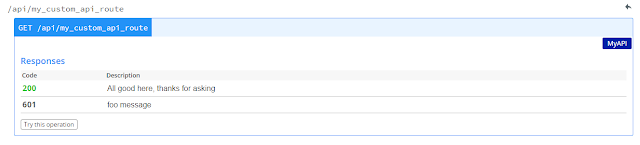
Swagger: How do I add custom return codes to my Web API?

Image
Swagger is great tool to document APIs, The standard return codes (200 - OK) do not always give enough detail about the endpoint. Fortunately, there are some simple annotations that can be added to give a better description about the return code. using Swashbuckle.Swagger.Annotations; using System.Web.Http; namespace MyNameSpace {     public class MyAPIController : ApiController     {         [HttpGet]         [Route("api/my_custom_api_route")]         [SwaggerResponse(System.Net.HttpStatusCode.OK, "All good here, thanks for asking")]         [SwaggerResponse(601, "foo message")]         public bool MyAPI()         {             return true;         }     } } The result is as follows:

Azure Function: Call a web service and return the result as a class

My current project is using Azure Functions as action triggers. Thanks to some nifty work from the Visual Studio team, we now have a local development environment. The following POC function will call a Web API (configured through API Management) and convert the resultant JSON into a class object. 1. Create a 'Model' solution that stores the class to be used. I called my MyModel. My class is called ApiResult. namespace MyModel {     public class ApiResult     {         public string Message { get; set; }     } } 2. Create an API to invoke using MyModel; using System.Web.Http; namespace MyControllers {     public class MyController : ApiController     {         [System.Web.Http.HttpGet]         [System.Web.Http.Route("api/myapiendpoint")]         public ApiResult ValidateFile()         {       ...